The problem
One till and one shelf is easy. A stall, a van and a shop selling from the same stock is not. Each place sells a bit, the lorry unloads somewhere else, and nobody can say how many are left or where the missing ones went. Spreadsheets drift, and counts done in a hurry do not agree.
Mini Till Pro adds stock control to the free till. It is for small traders with more than one counter, and it is the paid half of Mini Till. The till itself stays free.
How it works in four steps
- Deliveries go into a central store. One place holds the overall stock. That is where the delivery is booked in.
- Transfers push stock out to the places that sell. A bar, a counter, a van or a stall. Each location keeps its own count, and a Top up to par button fills in what a location is short of.
- Sales take stock off whichever location sold them. A till is tied to one location, so a sale there lowers that location's count and nowhere else's.
- Waste and stocktakes reconcile the difference. What came in, minus what sold, minus what was thrown away, should equal what is on the shelf. When it does not, the variance report shows where.
The stock control guide, step by step walks through each of these screens.
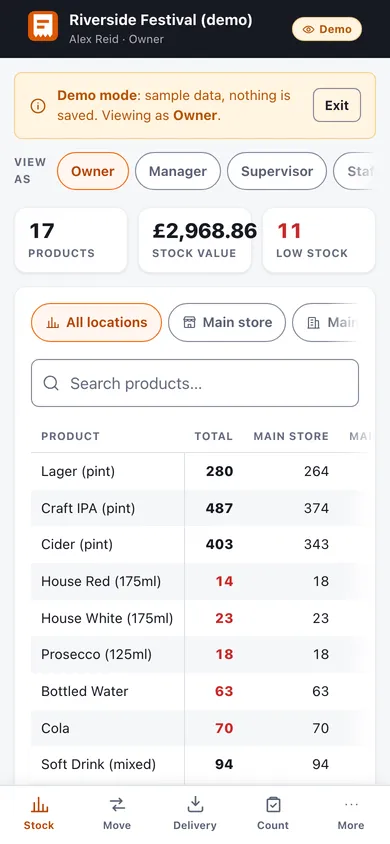
Who can do what
Each person signs in with a role, so everyone sees only the part of the job that is theirs.
- Owner: full control, including the team and its subscription.
- Manager: products, prices, stock, reports and the team.
- Supervisor: deliveries, transfers, stocktakes and reports. Cannot change prices or the team.
- Staff: sells on the till, moves stock between locations and logs waste.
- Viewer: read-only, so an accountant can look without changing anything.
When the signal drops
Sales are always written to the device first and sent to the team afterwards, so a till on a pitch with no signal keeps selling and catches up when the connection returns.
What it costs
Pro is £10 a month, or £100 a year, for a team of up to 5 people. Teams is £100 a month, or £1,000 a year, with no limit on the number of people. Both start with a 14-day free trial. Nothing is charged until day 14, and you pay nothing if you cancel before then. The full terms are on the pricing page. A sixth person moves you to Teams at £100 a month.
Try the demo first
The stock console demo loads four days of trade across three locations for a team of six, with nothing saved and no sign-up. You can switch between the roles and try each screen as that person.
Questions
Do I need it for one till?
No. If you have one counter, the free till does the job. Stock control earns its place when more than one location sells from shared stock.
Is it for a business with a lot of lines?
It is built for small multi-site traders. It does not scan barcodes, so a large retail catalogue would be slow to count.
Where do I read about the till itself?
The FAQ covers the till and Pro in plain answers, including how the trial works and what happens to your data if you cancel.