Do you need to take cards?
If your customers are standing at a pitch with no cash in their pocket, a cash-only stall sends them away. Plenty of people now pay for everything with a card or a phone, so most traders end up taking both. You do not need to guess: ask yourself how many people asked whether you take cards last month.
Taking cards costs money on every sale, so it is a trade. The sections below are about getting the trade right, and keeping an honest record of both kinds of sale.
The three ways to take a card on a pitch
- A small reader paired with your phone. It connects over Bluetooth and the phone's app sends the payment. Cheap to start, and it uses your phone's signal.
- A standalone terminal. A hand-held unit with its own screen, battery and connection, often wifi plus a mobile data SIM. It costs more and does not depend on a separate phone.
- Tap to pay on a phone. Some providers let the phone itself take a contactless payment, with no extra hardware to buy or lose.
All three need the reader or phone to reach the provider to authorise a payment. The till does not change that, and neither does the choice of till software.
Signal on a pitch
This is the real question for outdoor trading. Market halls with steel roofs, fields and festival sites come and go for signal. Before you pay for anything, ask the provider these in writing:
- What happens to a payment when there is no signal at the moment the customer taps?
- If a payment can be stored and sent later, is there a limit on how many or how much, and who carries the risk if it is later declined?
- Does the reader use your phone's data, its own SIM or wifi, and can it fall back to another connection?
- How long does the money take to reach your bank?
The answers differ between providers and they change, so get them from the provider and not from a comparison site. It is also worth testing a reader at the pitch you will use, a week before you rely on it.
Mini Till does not need a signal to record a sale. It keeps selling in aeroplane mode, so you can keep an accurate record even when the reader is struggling. Take the card payment when the reader allows it, and say honestly to a customer when it does not. There is more on the till side in a till that works with no signal.
Fees: what to compare
Fees vary between providers and change from time to time, so we do not print them here. Each of these providers publishes its own pricing:
Links checked on 13 October 2026. Whatever you look at, compare these, because the headline percentage is not the whole price:
- The rate on an ordinary UK debit card, and whether other card types cost more.
- Any monthly fee, and what it buys.
- The price of the reader, and whether it is bought outright or financed.
- How refunds are charged.
- How long the contract runs and what leaving costs.
To see what a rate means for you, use your own figures. As an illustration only, at an invented rate of 2 per cent, a day of £400 in card sales would cost £8 in fees. Put in a real rate and your own takings to see the effect. What a till system costs has more on card processing.
Recording card and cash in Mini Till
Mini Till does not process payments. It records that a sale was paid by card, so that the day's numbers add up. The routine at the pitch:
- Ring up the items on the till.
- Read out the total and key it into the card reader.
- Wait for the reader to say the payment is approved.
- Choose Card as the payment method on the till and complete the sale.
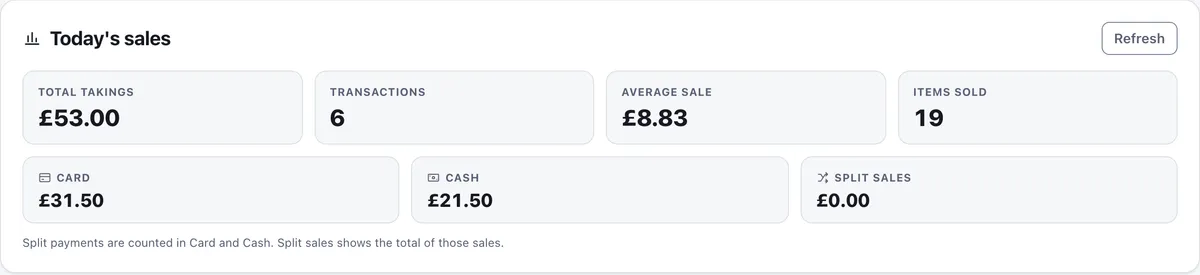
Take the card payment first and record it second. Doing it the other way round leaves a recorded sale with a declined card. For a mixed payment, choose Split, enter what was paid on card and what was paid in cash, and the till works out the change.
Matching the reader at the end of the day
Your reader keeps its own total for the day, and your provider pays out against it, usually a day or more later and after fees. At the end of the day compare the reader's day total with the Card figure in the till's Today's sales panel. If they differ, the cause is nearly always a card sale taken on the reader and never rung up, or a sale recorded as cash that was paid by card.
When the payout reaches your bank it will be smaller than the card total by the fees. That is normal, and your accountant will want the full card figure from the till and the fees as a separate cost. The cash up sheet has a line for each side.
Power and weather checklist
- Charge the reader and the phone the night before, and carry a power bank.
- Keep a spare cable. A reader that cannot charge ends the card side of the day.
- A sandwich bag over a reader and phone is a cheap guard against a shower.
- Keep a cash float anyway, so a dead reader does not stop the stall.
- Shade the screen. Glare is the main reason traders give up on a phone or tablet.
Where to go next
If you are just starting out, starting a market stall in the UK covers licences and costs. The routine for taking payments and reconciling is in the till manual, and the till itself is a free till app you can install on your phone.