This is general guidance, not tax advice. Rules and thresholds change. Each rule below links to the GOV.UK page it comes from, checked on 13 October 2026. If you are unsure, ask an accountant or HMRC.
What a small trader must keep
If you are a sole trader or in a partnership, you must keep records of your business income and expenses for your Self Assessment tax return. GOV.UK says to keep records of:
- all sales and income,
- all business expenses,
- VAT records, if you are registered for VAT,
- PAYE records, if you employ people,
- records about your personal income.
Your records must be accurate, and you must be able to identify business transactions. The proof GOV.UK lists includes receipts for goods and stock, bank statements, and sales invoices, till rolls and bank slips. Source: GOV.UK, business records if you're self-employed: what records to keep.
For a stall or a counter, that means the record of every sale, plus the day's totals split by cash and card.
How long to keep them
For Self Assessment you must keep records for at least 5 years after the 31 January submission deadline of the relevant tax year. GOV.UK gives an example: if you sent your 2022 to 2023 tax return online by 31 January 2024, you must keep your records until at least the end of January 2029. Source: GOV.UK, how long to keep your records.
If you are VAT-registered, you must keep VAT records for at least 6 years. Source: GOV.UK, keeping VAT records.
Limited companies follow different rules, which are on GOV.UK's company and accounting records page.
Cash basis, in plain terms
From the 2024 to 2025 tax year, cash basis is the default method of accounting for most self-employed people. With it you record income when you receive the money and expenses when you pay a bill. You can opt out if you want traditional accounting. Source: GOV.UK, business records if you're self-employed.
VAT and the till
You must register for VAT if your total taxable turnover for the last 12 months goes over £90,000, or if you expect it to go over £90,000 in the next 30 days. You can register voluntarily below that. Source: GOV.UK, register for VAT.
If you are VAT-registered, the records you must keep include everything you buy and sell, and general business records such as till rolls. If you use a retail scheme you must keep your total daily gross takings digitally. Source: GOV.UK, keeping VAT records. A retail scheme is one way for a shop to work out its VAT from its takings, and GOV.UK explains the standard ones on its VAT retail schemes page.
Mini Till treats prices as including VAT at 20 per cent and shows the VAT contained in each sale. It uses one rate. If you sell items at different VAT rates, check with your accountant how to handle the figure the till shows. The rates are on GOV.UK's VAT rates page.
Making Tax Digital
Making Tax Digital for VAT means keeping some VAT records digitally and filing returns through compatible software. GOV.UK says all VAT-registered businesses should now be signed up. Where you use more than one piece of software, the records must be linked digitally, and GOV.UK lists importing and exporting CSV files among the ways to do that. Source: GOV.UK, keeping VAT records.
Making Tax Digital for Income Tax applies from 6 April 2026 if your total annual income from self-employment and property is over £50,000. That income is measured before expenses and is based on the tax return you submitted in the previous year. If your income is below that, GOV.UK has a page to find out if and when you need to use it. Source: GOV.UK, sign up for Making Tax Digital for Income Tax.
What Mini Till gives you
The till is not an accounting package and it does not file anything for you. What it does is keep a clear record of each sale, which is the part a stall or a counter has to get right:
- the date and time, the items, the payment method and the total of every sale,
- the VAT contained in each sale, shown on the sale and in the export,
- a daily summary of takings, with card and cash shown separately,
- an Export CSV button that downloads the full sales history as a spreadsheet,
- a backup file for the whole till, which restores onto any device.
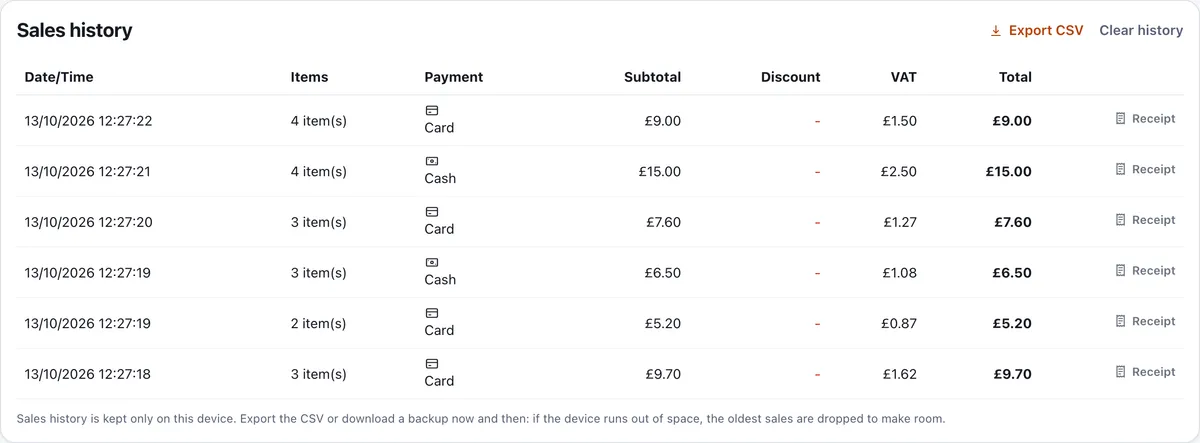
Your sales history is stored on your device, so it is only as safe as the device. Export the CSV at the end of each trading day, and save it somewhere that is not the same phone. A voided sale stays in the history and is marked Voided, so there is a trace of what happened. The CSV is a digital record you can hand to an accountant or load into accounting software.
The cash up sheet is a daily paper record to go with it, and cash handling for small businesses covers the habits that keep both honest. For the wider picture of what an EPOS system does, read the guide to EPOS systems.