What a van needs from a till
A coffee or food van is a counter with a queue. The till has to be fast, work at an event field with no signal, survive a damp morning and cost nothing to leave running. Everything else is secondary.
- Speed in a queue. One tap per item, a running total, and change worked out for you.
- No dependence on signal. Once opened, Mini Till keeps working in aeroplane mode, and sales are saved on the device.
- Little power. It is a web page, not a heavy app. Keep brightness down and carry a power bank.
- Hands that are busy. Large buttons, and a payment step with Exact, +£5, +£10 and +£20 buttons for cash.
Setting up your menu as buttons
Add each item as a product with a short name and a price, and put the best sellers first. The five lines that make most of your money should sit where your thumb lands without looking.
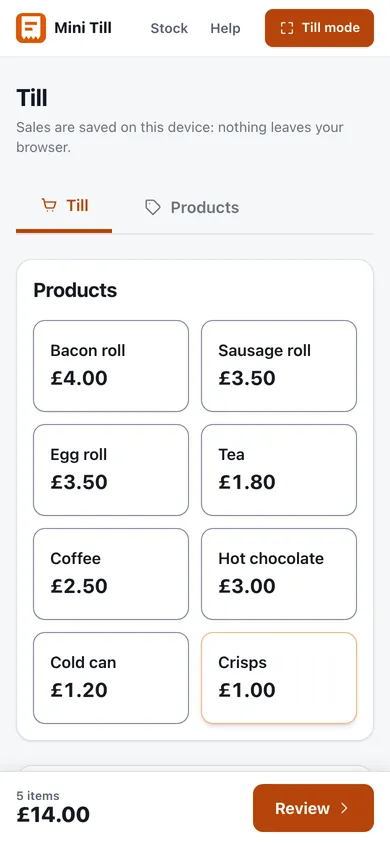
Mini Till has no modifiers. There is no way to attach "oat milk" or "extra shot" to a flat white as an option. The workaround is to give each common variation its own button, with the size or the variation in the name:
- Flat white
- Flat white, oat
- Large flat white
- Bacon roll
- Bacon roll and egg
That works for a short menu. If you have dozens of combinations, the list gets long, and a till with modifiers will suit you better. There is also no tips field. If customers tip, keep the jar separate and do not ring the tip up as a sale, so your takings stay honest.
Prices are treated as including VAT at 20 per cent, and each sale shows the VAT inside it. Some food is zero-rated and some is standard-rated, so check your own position. GOV.UK lists the rates on different goods and services, and hot takeaway food is among the things that are always standard-rated. If you sell zero-rated items, ask your accountant how to handle the VAT figure the till shows, because it uses a single rate.
Peak-hour flow
When the queue builds, the routine matters more than the software.
- Tap the items as the customer says them, and read the running total out loud.
- For cash, tap what they hand over. The till shows the change due. Count it back to them.
- For card, key the total into your reader, wait for the approval, then choose Card on the till.
- For a mixed payment, choose Split and enter the card part and the cash part.
- Complete the sale and press Next sale for the next customer.
Receipts are rarely wanted at a van. If someone asks, find the sale in Sales history and press Receipt. It goes to your browser's print dialogue, so it needs a printer your phone or tablet can reach. There is no kitchen printer, no order tickets and no table service. Orders are called out or written on a pad.
Cashing up in the van
At the end of the shift, count the cash, take off the float you started with and compare what is left against the Cash figure in Today's sales. Then match your card reader's day total against the Card figure. The cash up sheet keeps the numbers in one place, and the steps are in the till manual. For keeping the takings safe between shift and bank, see cash handling for a small business.
Export the day to CSV before you drive off, and download a backup of the till now and then. The data lives on the device, so a dropped phone should not mean a lost month. How to take cards well at an event is in taking card payments on a market stall.
When a van outgrows a free till
Each device keeps its own sales. If you run two vans, or a van and a stall, and want one stock count and one set of figures, Mini Till Pro holds stock centrally, moves it out to each location and reports takings per location and per person. The till itself stays free. If you need integrated online ordering, kitchen screens or loyalty, a heavier system will serve you better.
Food rules live elsewhere
Mini Till is a till, not food safety paperwork. If you are starting a food business, you must register it with your local authority. GOV.UK explains how to register a food business. For the rest of the basics, including licences and costs, read starting a market stall in the UK.